
Claude Code customization piles up across user settings, project settings, plugins, skills, subagents, mods, launchers and managed policy. That makes a plain question surprisingly hard to answer: what runs automatically in my setup? Where did it come from, which plugin owns it, is its configuration broken or surprising, and what should I review first?
I built Hook X-ray to help: a free, open-source, local tool for reviewing Claude Code hooks and mods. Its tagline is “See what runs automatically,” and this post covers where that promise stops. If you use plugins, write them, or maintain a shared team config, it’s for you.
Hooks and Mods, Briefly
A hook is configuration that makes Claude Code run something at a point in its lifecycle: around a tool call, at session start, when you submit a prompt. Hooks come from user, project and local settings, managed policy, plugins, and skill and subagent frontmatter. Skill hooks register once the skill is invoked; subagent hooks run only while that subagent does.
A mod is a plugin that runs JavaScript inside Claude Code. It sees every prompt and tool call and can change them.
The official docs are specific. Command hooks, local MCP servers, plugin monitors and LSP servers run outside the Bash sandbox with your full access, and native Windows has no sandbox. Mods aren’t sandboxed either. Permission rules apply to Claude’s tool calls, not to a mod’s own file and process calls: with Read(.env) denied, a mod can still read that file with $.fs.read.
Whether a mod can approve a call that a deny rule refuses depends on the setup. The permissions page says the call stays refused with managed settings or a Team or Enterprise login, and that without either, a mod can approve it.
None of this means your setup is unsafe, and the problem isn’t only malicious code. Ordinary mistakes cost you too: duplicate handlers, confusing matchers, per-prompt context, and a 600-second default timeout nobody chose.
Why I Built It
The project began as an evaluation of three small tools for Claude Code users: a skill collision checker, a hook inventory and review CLI, and a plugin update diff tool. I picked the hook tool first and kept it narrow: inventory, ownership and config lint, not a broad security scanner.
Testing on real configurations exposed a second problem: a raw inventory is another wall of output. Repeated notes, long lists of missing files, and unclear ownership buried what deserved attention. So the direction became: show what matters first, explain who owns it, and make the output useful.
What a Review Turned Up
These are observations from my development runs; yours will differ.
- Five hooks across three plugins.
- One plugin’s hook added context on every prompt.
- Another plugin’s hook had no explicit timeout.
- Four repeated shell-form notes: three from one plugin, one from another.
- A compaction mod that appeared to call an external API.
Be careful with that last one. The inventory showed a mod with a hook on conversation-related events and a network-capable API call. That is a reason to read its source, not evidence that conversation content is sent anywhere. I haven’t confirmed it either way. Hook X-ray has no rule that combines those signals today; that analysis is planned, not shipped.
In another workspace, ~/.claude/settings.json was empty while a launcher supplied a Stop hook through another source. That helped motivate the live companion below.
How the Review Works
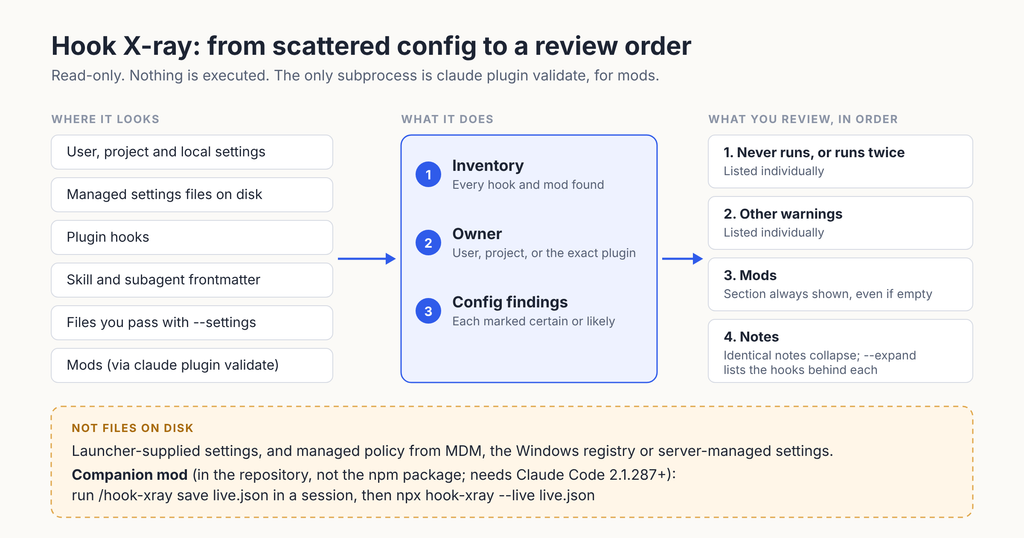
The workflow: inventory, owner attribution, configuration findings, then your judgment. The most actionable items come first:
- Hooks that never run, or run twice, lead. → The easiest wins.
- Other warnings stay listed one by one.
- The mods section is always visible, even when empty. → Empty is information too.
- Identical informational notes collapse into one line;
--expandlists the hooks behind it. - Plugin-owned findings say so. “Disable the plugin” appears on warnings, not routine notes.
Each finding carries a confidence: certain only for facts from configuration, likely for anything inferred from a hook’s command or script.

This excerpt is illustrative: a throwaway demo configuration built to trigger a few rules, not a real machine.
Never runs or runs twice
  ⚠ h1   SessionStart command · user · 600s default
       echo hi
       `if: "Bash(git *)"` on SessionStart: this hook never runs
       fix: Remove `if`, or move the hook to a tool event.

  ⚠ h5   PostToolUse [*] command · plugin:lint-helper · 10s
       ./fmt.sh
       same handler as h3 (user): runs twice
       fix: Remove one of the two copies.
       Plugin-owned: report it to the author; disable the plugin if the
       behavior is unwanted.
Per the hooks reference, if only works on tool events, and a plugin’s copy of a handler runs separately from a settings copy.
Hook X-ray never reads a mod’s JavaScript; it reports what claude plugin validate --json lists: hooks, API calls and environment access. Without claude on your PATH, a mod shows as present, validation unavailable.
Quick Start: One Command
Node 20 or newer is required.
npx hook-xray                     # this project, user, managed settings, plugins
npx hook-xray --all-projects      # every project listed in ~/.claude.json
npx hook-xray --sources           # sources found, missing or broken, with a short summary
npx hook-xray --event PreToolUse  # one event
npx hook-xray --json --redact     # a report to review before sharing
--json keeps every hook and finding. --redact hides tokens, header and env values, hosts, prompts and home paths, but skim before sharing. Scratch workspaces are labeled, and unreadable files are told apart from invalid JSON.
Disk Review and the Live Companion
By default it reads files on disk: user, project, local and managed settings, plugin hooks, skill and subagent frontmatter, and any file you pass with --settings. Some sources aren’t readable files: launcher-supplied settings, and managed policy delivered through MDM, the Windows registry or server-managed settings. For those, the repository includes a companion mod, mods/hook-xray-live. It reads session settings with $.settings.read and lints them with the rules that depend only on configuration. The CLI can load its snapshot and apply all its rules.
The companion isn’t in the npm package, so clone the repository to use it. Because it is itself a mod, it needs Claude Code 2.1.287 or later:
git clone https://github.com/nazrul-kabir/hook-xray
claude --plugin-dir ./hook-xray/mods/hook-xray-live
# in the session:
#   /hook-xray                  hooks from --settings/SDK and managed policy
#   /hook-xray save live.json   write a snapshot
npx hook-xray --live live.json
I’m not claiming it sees more than the built-in /hooks browser. What it adds is workflow: reusable lint findings, an exportable snapshot, and scriptable output. /hooks is a good look at one session; Hook X-ray reviews across projects, with exact plugin ownership, dormant skill and subagent hooks, and machine-readable reports.
Cost, Requirements and Limits
- Free and open source. MIT license.
- No telemetry that I could find in the source, and no network requests in the analysis code.
npxdoes fetch the package from npm. - One subprocess:
claude plugin validate --json, for mods; skip it with--no-validate. I haven’t audited Claude Code’s internals when it runs that. - No model calls from the CLI or the companion mod.
- Read-only. It never runs a hook, starts an MCP server or edits settings. The mod writes a file only when you ask it to save.
It is not antivirus, and a clean report doesn’t mean a plugin is safe. It enforces nothing, and can’t see runtime-registered hooks or plugins loaded only with --plugin-dir. Broader risk analysis (network and package-execution signals, settings changes, per-handler explanations) is planned, not in the current release, 0.1.1.
An Early Milestone
Per the npm API, hook-xray had 543 downloads across the first three days of download activity (November 6 to 8, 2026), spanning two releases. That mixes automation, repeats and updates: a launch milestone, not a measure of users.
Final Thoughts: Try It and Tell Me
Run npx hook-xray on a setup you know, then tell me what it found, or missed. Open a GitHub issue, ideally with a redacted --json report. The package is on npm.