
We upgraded React Native and never touched our map code, yet the map started crashing. This post covers how we found the cause and how to fix it if you hit the same crash.
Who this is for: React Native developers on the New Architecture (Fabric) who use
react-native-mapswith Google Maps on iOS. You don’t need any C++ or Objective-C knowledge. Every native detail gets a plain-English explanation.
TL;DR: the quick fix
yarn up react-native-maps@1.29.11        # or: npm install react-native-maps@1.29.11
cd ios && pod update react-native-maps --no-repo-update
react-native-maps 1.29.4 and later stop the crash. Read on to find out why it happened, what it has to do with React Native 0.88, and the smaller bug that remains after the fix.
Are you affected?
You are likely hitting this bug if all of these are true:
- [ ] iOS app with the New Architecture (Fabric) enabled
- [ ] React Native 0.88 or newer (we went from 0.85 to 0.88 and didn’t test 0.86 or 0.87)
- [ ]
react-native-mapsolder than 1.29.4, using the Google provider - [ ] The map has children such as markers or polygons
- [ ] The map’s screen gets hidden with
display: 'none'when you leave it. A common cause isdetachInactiveScreens={false}on a tab navigator.
Check your installed version with:
yarn why react-native-maps # or: npm ls react-native-maps
The symptom: an NSRangeException after switching tabs
The app never crashed at startup. It crashed anywhere from 15 seconds to 3 hours into a session, always right after returning to the map tab:
*** Terminating app due to uncaught exception 'NSRangeException',
reason: '*** -[__NSArrayM insertObject:atIndex:]: index 7 beyond bounds for empty array'

  CoreFoundation    -[__NSArrayM insertObject:atIndex:]
  MyApp.debug.dylib -[AIRGoogleMap insertReactSubview:atIndex:]
  MyApp.debug.dylib -[RNMapsGoogleMapView loadPendingInsertSubviews]
  MyApp.debug.dylib -[RNMapsGoogleMapView prepareContentView]::$_3 (onMapReady block)
  MyApp.debug.dylib -[AIRGoogleMap didPrepareMap]
  MyApp.debug.dylib -[AIRGoogleMapManager mapViewDidStartTileRendering:]
  ... GMSMapView / CADisplayLink ...
A second variant crashed through -[RNMapsGoogleMapView mountChildComponentView:index:] instead.
Every crash report had two things in common:
- the array was always empty
- the index was always greater than 0
Put simply, React Native tried to insert the 8th child into a list that should have held 7 children and actually held none. The native map’s child list was out of sync with what React Native believed it contained.
Reproduction was simple but flaky. Zoom in until the polygons appear, switch to another tab, switch back, and repeat. The app usually crashed within a few cycles. Android was not affected.
Background: how Fabric gets your components onto the screen
You need a rough picture of Fabric’s rendering pipeline to follow the rest of this post. It takes about two minutes.

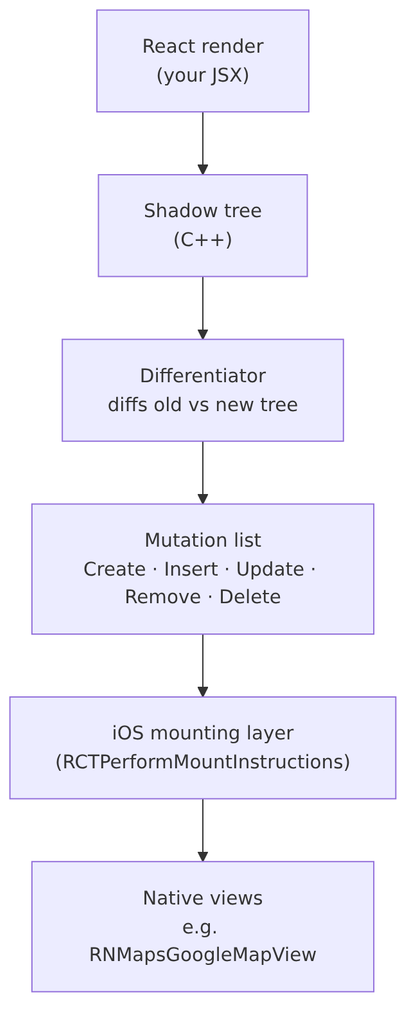
How Fabric turns React components into native views on iOS
- React renders your components, and Fabric builds a shadow tree in C++ that mirrors your component tree.
- When something changes, the Differentiator compares the old shadow tree with the new one.
- The diff becomes a list of mutations: create this view, insert it into that parent at index N, update its props, delete that view.
- On iOS, the mounting layer applies those mutations to real
UIViews.
Two details matter for this bug:
- The order of mutations in that list. The Differentiator decides it.
- On iOS, a view’s props are applied when the view is inserted, not when it’s created. A native component that only builds its internals once its props arrive has to wait until it’s inserted into its parent.
What the upgrade changed (and didn’t change)
Crash reports started the morning after the React Native upgrade was merged. There were none before it.
| Package | Before | After |
|---|---|---|
react-native | 0.85.3 | 0.88.1 |
react | 19.2.3 | 19.3.0 |
@react-navigation/* | 7.x | newer 7.x |
react-native-screens | 4.23.0 | 4.30.1 |
react-native-maps | 1.26.20 | 1.26.20 (unchanged) |
The map library, the Google Maps pods, and our map code were all unchanged. Something in the framework had changed how it called the map library.
The debugging technique: instrument what you can edit
My first instinct was to log Fabric’s mount instructions. That isn’t possible on 0.88, because React Native core now ships prebuilt (React-Core-prebuilt), so you can’t add an NSLog to the mounting manager.
Third-party libraries are still compiled from source, though. I added temporary [MAPDBG] logs to node_modules/react-native-maps/ios/AirGoogleMaps/RNMapsGoogleMapView.mm at every lifecycle point:
initWithFrame,prepareForRecycleprepareContentView, where the nativeAIRGoogleMapgets createdmountChildComponentView/unmountChildComponentViewloadPendingInsertSubviewswillMoveToSuperview:, which dumped the ancestor chain
Each log line recorded which host view, which native map instance, whether the map was ready, and what was waiting in the queue. Here’s an example:
NSLog(@"[MAPDBG] host=%p view=%p ready=%d mount idx=%ld child=%@ pending=%@",
      self, _view, [_view isReady], (long)index,
      NSStringFromClass([child class]), _pendingInsertsSubviews.allKeys);
Then I streamed only those lines from the simulator:
xcrun simctl spawn booted log stream --style compact \
  --predicate 'process == "MyApp" AND (eventMessage CONTAINS "[MAPDBG]" OR eventMessage CONTAINS "beyond bounds")'
💡 Reusable trick: when the framework is a black box, instrument the first layer you can edit, and work out the framework’s behaviour from the calls it makes into that layer. The logs disappear on the next
node_modulesreinstall, which is what you want for temporary debugging.
The logs revealed three separate problems. Each one is harmless alone, and together they crash the app:

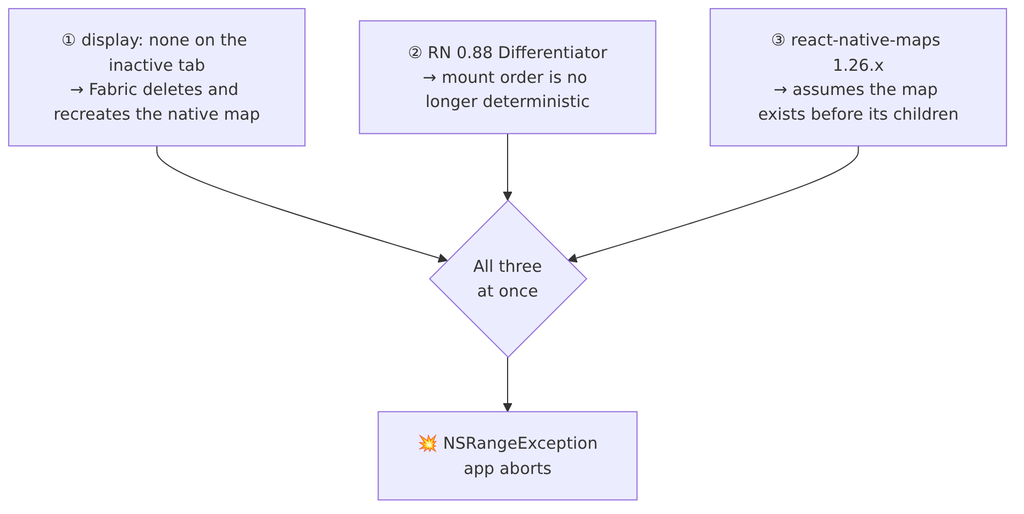
The three conditions that combine into the crash
Finding 1: Fabric destroys the map on every tab switch
14:04:38.377 host=0x1545a5bf0 view=0x155c35200 ready=1  prepareForRecycle
14:04:39.163 host=0x1545a5bf0 view=0x155caa400 ready=0  prepareContentView NEW map
14:04:40.468 host=0x1545a5bf0 view=0x155caa400 ready=1  prepareForRecycle
14:04:41.111 host=0x1545a5bf0 view=0x119aa2800 ready=0  prepareContentView NEW map
14:04:42.005 host=0x1545a5bf0 view=0x119aa2800 ready=1  prepareForRecycle
14:04:42.622 host=0x1545a5bf0 view=0x32b869200 ready=0  prepareContentView NEW map
The view= address changes on every line. The app created a new native Google map each time the tab came back, four times in six seconds. The React tag stayed the same, so React never remounted anything. Fabric deleted and recreated the native views for the same shadow nodes.
The cause was our navigator setup:
<Tab.Navigator detachInactiveScreens={false}>
  {/* ... */}
</Tab.Navigator>
detachInactiveScreens={false}is a common workaround for a blank-screen bug in React Navigation.- With detaching turned off,
react-native-screens‘Screenfalls back to hiding inactive screens withstyle: { display: activityState !== 0 ? 'flex' : 'none' }. - Fabric marks
display: nonenodes as hidden (ShadowNodeTraits::Trait::Hidden) and leaves them out when it builds the native view tree. Their native views are deleted, then recreated when the screen becomes visible again.
Meanwhile, the JavaScript side remembered everything:
<MapView onMapReady={() => setMapLoaded(true)}>
  {mapLoaded && children}   {/* still true from the FIRST onMapReady */}
</MapView>

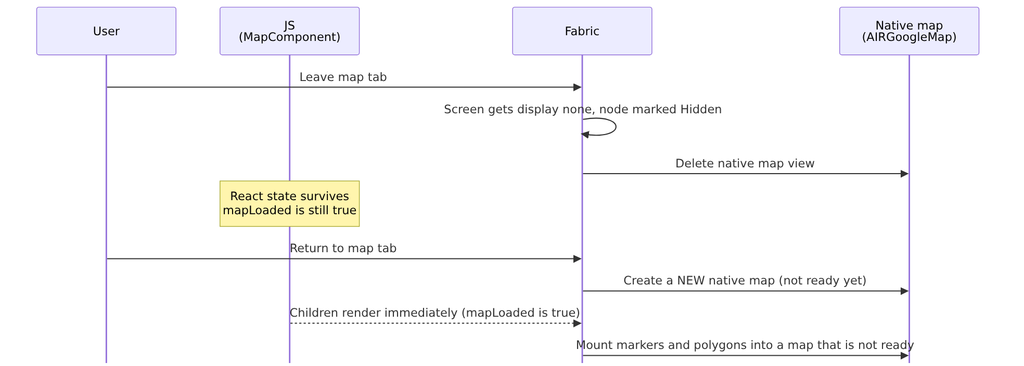
What happens to the native map on a tab round-trip
Important: this was already happening on 0.85. The map was rebuilt on every tab switch there too, and the app didn’t crash. Something else had changed.
Finding 2: React Native 0.88 made mount order non-deterministic
In a healthy cycle, the map is created first and the children come after it:
14:04:41.111 view=0x119aa2800  prepareContentView NEW map
14:04:41.136 view=0x119aa2800  mount idx=0..5  (markers → queued 0..5)
14:04:41.145 view=0x119aa2800  loadPending pending=(0,1,2,3,4,5)  → OK
In a crash cycle, the children arrive before the map exists:
14:04:44.221 view=0x0 ready=0  mount idx=0 child=RNMapsGooglePolygonView   ← sent to nil map, DROPPED
   ...                         mount idx=1..8 child=RNMapsGooglePolygonView ← all 9 polygons dropped
14:04:44.235 view=0x165b02e00  prepareContentView NEW map
14:04:44.260 ready=0           mount idx=9..14 (markers → queued 9..14)
14:04:44.273 pending=(9,10,11,12,13,14)  loadPending BEGIN
14:04:44.352 *** NSRangeException: index 9 beyond bounds for empty array
The same tab switch produced two different mount orders. To find out why, I diffed ReactCommon/react/renderer/mounting/Differentiator.cpp between the two versions:
| Version | Container used while diffing | Iteration order |
|---|---|---|
| 0.85.3 | DiffMap, which picks TinyMap (insertion-ordered vector) unless the useUnorderedMapInDifferentiator flag is on. The flag defaults to false. | Insertion order (deterministic) |
| 0.88.1 | DiffMap.h and TinyMap.h removed. Always std::unordered_map. | Hash order (can change between commits) |
The Differentiator emits mutations while iterating those maps. With an unordered map, these two mutations can come out in either order:
- “insert the children into the map view”
- “insert the map view into its parent”
Now recall the earlier detail: on iOS, props are applied on Insert. RNMapsGoogleMapView only creates its native map in prepareContentView, which runs when props are updated. If the children are inserted first, mountChildComponentView runs while _view (the native map) is still nil.
How sure am I? Findings 1 and 3 are proven by the native logs. Finding 2 rests on the source diff plus logs showing both orders for the same transition. I couldn’t trace the mutation list directly, because core is prebuilt.
Finding 3: react-native-maps assumed an order it was never guaranteed
Here’s the relevant part of RNMapsGoogleMapView.mm in 1.26.20, trimmed:
- (void)mountChildComponentView:(UIView<RCTComponentViewProtocol> *)child index:(NSInteger)index {
    id<RCTComponent> paperView = [child getPaperViewFromChildComponentView];
    if (paperView) {                                   // markers
        if (_view && [_view isReady]) {
            [_view insertReactSubview:paperView atIndex:index];
        } else {
            [_pendingInsertsSubviews setObject:paperView forKey:@(index)];   // keyed by ABSOLUTE index
        }
    } else {                                           // polygons (Fabric-native)
        [_view insertReactSubview:child atIndex:index];                     // _view may be nil → silently dropped
    }
}

- (void)loadPendingInsertSubviews {                    // runs once, from onMapReady
    for (NSNumber *key in sortedKeys) {
        [_view insertReactSubview:_pendingInsertsSubviews[key] atIndex:key.integerValue];
    }
}
Objective-C note for JS developers: sending a message to
nildoesn’t throw. It does nothing and returns zero. That’s why the polygons disappeared without any error, much like callingundefined?.insert()in JavaScript.
Here’s the crash cycle step by step, with both mount orders side by side:

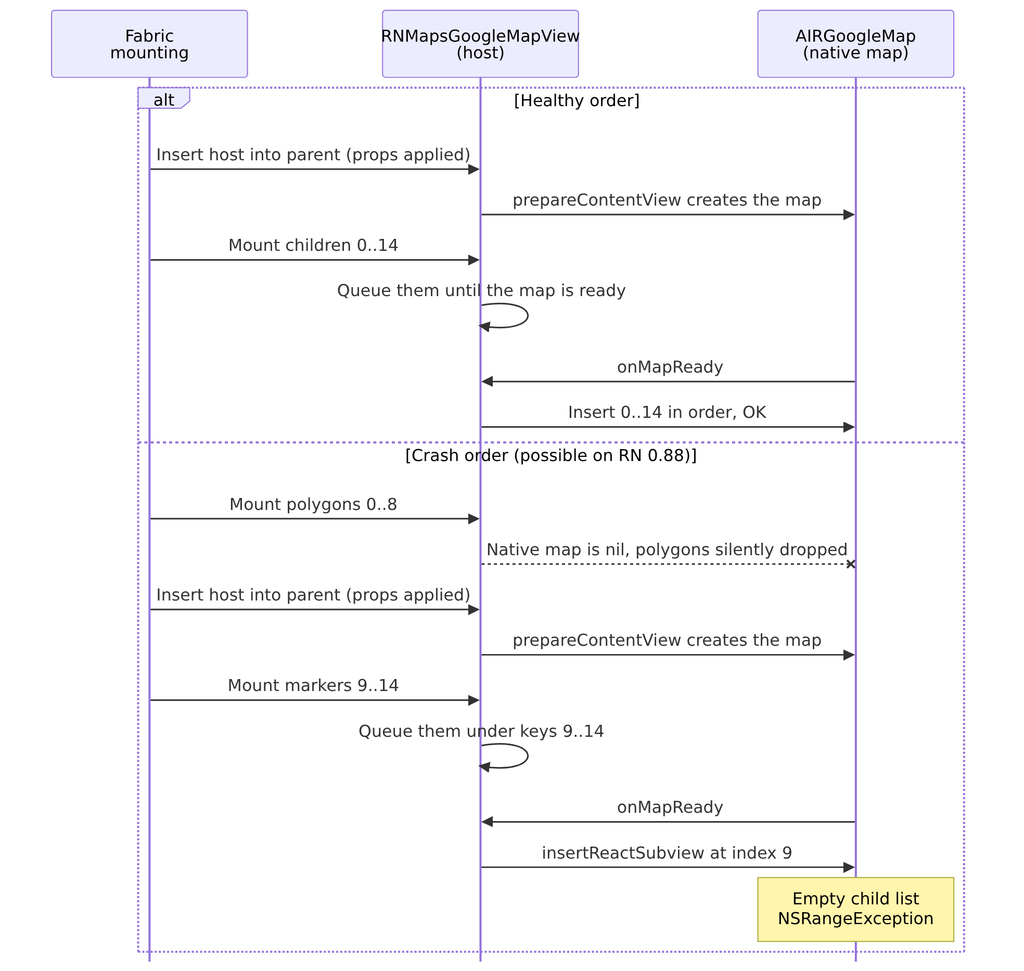
Healthy mount order vs the crash order on React Native 0.88
From the native map’s point of view:
| Step | What Fabric thinks the map holds | What the native child list actually holds |
|---|---|---|
Polygons 0–8 mounted while map is nil | 9 children | 0 (all dropped) |
| Markers 9–14 queued | 15 children | 0 (queued, not inserted) |
onMapReady replays key 9 | insert at 9 | count is 0 → 💥 |
AIRGoogleMap then calls [_reactSubviews insertObject:atIndex:] with no bounds check, which throws NSRangeException and aborts the app.
That adds up to four defects in the library:
- Non-paper children (polygons) aren’t queued when the map isn’t ready.
- Queued children keep their absolute indices even when earlier siblings never arrived.
- Unmounting before the map is ready doesn’t shift the remaining queue keys.
- There’s no bounds check on insert.
The fix: upgrade react-native-maps to 1.29.4 or later
yarn up react-native-maps@1.29.11        # or: npm install react-native-maps@1.29.11
cd ios && pod update react-native-maps --no-repo-update
I diffed the published npm tarballs to confirm what changed. Starting in 1.29.4, AIRGoogleMap.mm clamps the insert index:
- [_reactSubviews insertObject:(UIView *)subview atIndex:(NSUInteger) atIndex];
+ NSUInteger safeIndex = atIndex < 0 ? 0 : (NSUInteger)atIndex;
+ safeIndex = MIN(safeIndex, _reactSubviews.count);
+ [_reactSubviews insertObject:(UIView *)subview atIndex:safeIndex];
Both crash paths, the pending-queue replay and the direct mount, go through that one line, so this single change covers both.
The lockfile diff touched only react-native-maps. After the bump we had zero new crash reports, and the map tests and web build still passed.
What’s still broken upstream: missing polygons
The clamp stops the crash. It doesn’t fix the ordering bug. As of 1.29.11, RNMapsGoogleMapView.mm still sends polygons to a nil map, so after a tab round-trip polygons can be missing until their data re-renders. It’s a visible bug, though no longer a crash.
Option A: patch the library
Use patch-package (or yarn patch on Yarn Berry) to change RNMapsGoogleMapView.mm so it:
- queues all children (paper and Fabric-native) in mount order while the map is
nilor not ready, instead of keying them by absolute index - replays them in order on
onMapReady, clamps each index to the current count, and callsdidInsertInMap:for polygons - removes queued entries by identity, not by index, when they unmount early
This would also make a good upstream PR, because it affects every Fabric app that toggles a map’s visibility.
Option B: avoid the trigger
Stop the map screen from being destroyed when it loses focus. You can use freezeOnBlur, or avoid hiding the screen with display: none. Check why detachInactiveScreens={false} is there before you remove it, because it’s often a workaround for a different bug.
Lessons for React Native developers
- “We didn’t change that library” proves nothing. A framework upgrade can change the order in which your dependencies are called, and that alone can break them.
- In Fabric,
display: nonedeletes the native view. For expensive or stateful native components (maps, video players, WebViews), hiding them this way rebuilds them every time they reappear. - JS state and native state can drift apart.
mapLoaded === truein JavaScript described a native map that no longer existed. - Native components shouldn’t rely on mount order. If a component needs its own props before its children arrive, it must queue the children itself. Fabric doesn’t guarantee the order.
- When the framework is prebuilt, instrument the layer below it. About twenty lines of
NSLoginnode_modulesand onelog streampredicate found what a full day of reading code didn’t.
FAQ
Why does react-native-maps crash after upgrading to React Native 0.88?
React Native 0.88’s Differentiator always uses std::unordered_map, so mount mutations no longer come out in a fixed order. A map’s children can be mounted before the map’s own props are applied. On iOS that means before the native Google map exists. react-native-maps versions before 1.29.4 don’t handle that order and crash with NSRangeException.
Which react-native-maps version fixes the NSRangeException?
1.29.4 and later clamp the insert index in AIRGoogleMap, which stops the crash. We upgraded to 1.29.11. Polygons can still go missing after a tab switch until upstream fixes the ordering itself.
Does this crash affect Android?
No. We could only reproduce it on iOS with the Google Maps provider.
Why does display: none recreate native views in Fabric?
Fabric marks nodes with display: none as hidden and leaves them out when it builds the native view tree. Their native views are deleted and then recreated when they become visible again, even though the React components stay mounted and keep their state.
Is detachInactiveScreens={false} the problem?
It’s part of the trigger, because it makes react-native-screens hide inactive screens with display: none. It isn’t the root cause, though. The crash requires the unordered mount order in RN 0.88 and the unsafe insert in older react-native-maps as well.
If you’re on React Native 0.88+ with Fabric, use react-native-maps with Google Maps on iOS, and hide screens with display: none, check your react-native-maps version today.